Plugins
Plugins add what beatcode doesn’t ship with: 53 programming languages, 46 written languages, two more AI providers, a recorder and a gist previewer. Each is a small program that beatcode starts when it needs it.
The command output was taken against a local copy of the release, in an empty home folder. The screenshot was recorded with beatcode record after installing C.
01Install and remove
beatcode plugins install with no name lists every plugin in the Releases of the same version as your beatcode. Give names to install them: the short form (c, zh, ollama, record) is enough when it means one plugin.
Each one is downloaded for your machine (Apple silicon or Intel), checked against its SHA-256 and put in ~/.local/share/beatcode/plugins/. beatcode looks there after PATH, so a plugin of the same name on PATH wins.
A new language gets its own tab after the built-in ones, with two or three bundled charts, and is used for the files in your repos too. beatcode plugins uninstall zh removes one.
beatcode plugins install c zhDownloading beatcode-plugin-lang-c-aarch64-apple-darwin.tar.gzInstalled: ~/.local/share/beatcode/plugins/beatcode-plugin-lang-cDownloading beatcode-plugin-nlang-zh-aarch64-apple-darwin.tar.gzInstalled: ~/.local/share/beatcode/plugins/beatcode-plugin-nlang-zhCheck with: beatcode plugins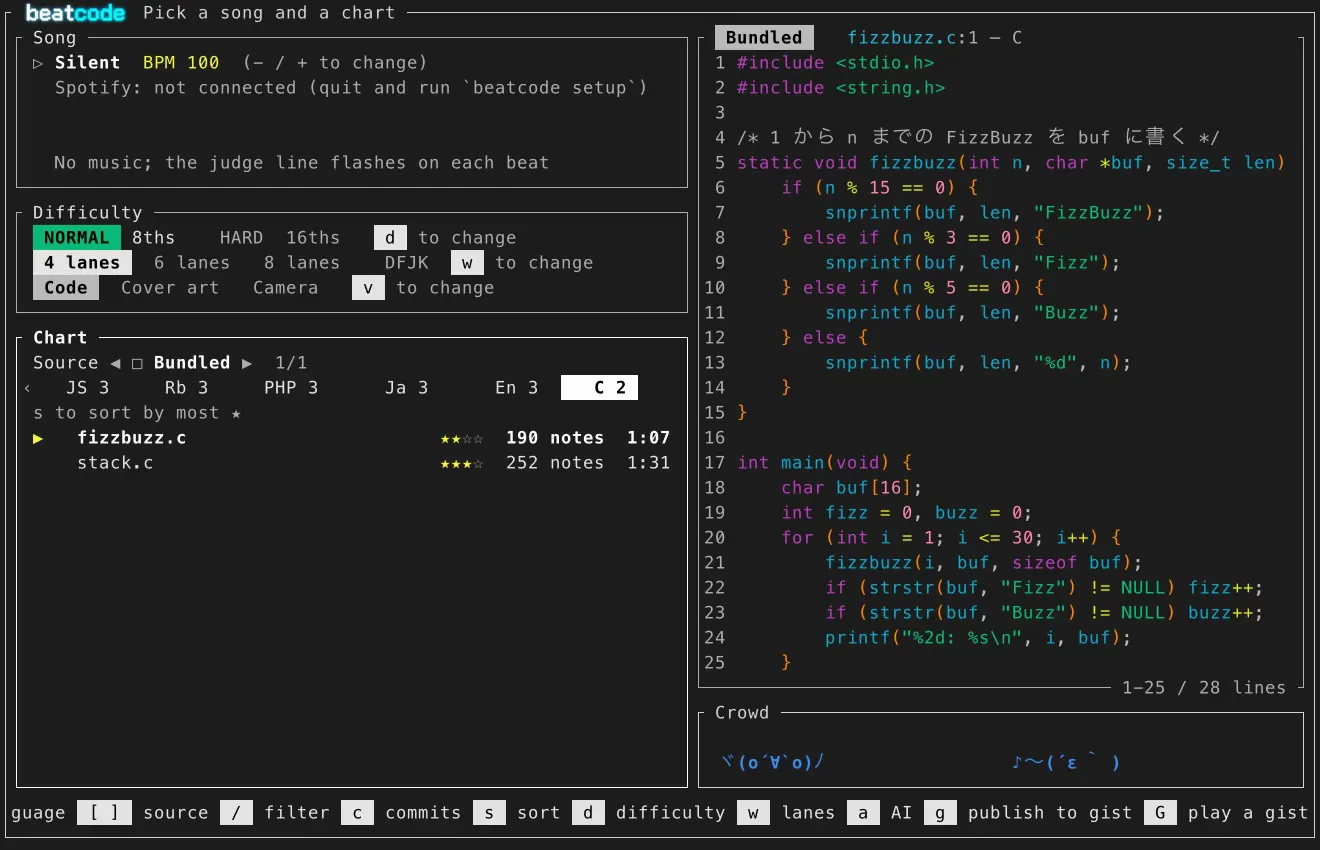
02Programming languages
53 languages. Charts from code in them: the bundled ones, AI charts and the files in your repos. The name on the left is what you give beatcode plugins install.
| Install | Language | Files |
|---|---|---|
| asm | Assembly | .s .asm |
| batch | Batch | .bat .cmd |
| c | C | .c .h |
| clojure | Clojure | .clj .cljs .cljc .edn |
| cobol | COBOL | .cob .cbl .cpy |
| coffeescript | CoffeeScript | .coffee |
| cpp | C++ | .cpp .cc .cxx .hpp .hh .hxx .h .ipp .tpp .inl .ixx .cppm |
| csharp | C# | .cs .csx |
| css | CSS | .css .scss |
| cuda | CUDA | .cu .cuh |
| dart | Dart | .dart |
| dockerfile | Dockerfile | Dockerfile Containerfile *.Dockerfile |
| elixir | Elixir | .ex .exs |
| erlang | Erlang | .erl .hrl |
| fsharp | F# | .fs .fsi .fsx |
| gleam | Gleam | .gleam |
| graphql | GraphQL | .graphql .gql |
| groovy | Groovy | .groovy .gradle |
| haskell | Haskell | .hs |
| html | HTML | .html .htm |
| ipynb | Jupyter | .ipynb |
| java | Java | .java |
| json | JSON | .json |
| julia | Julia | .jl |
| kotlin | Kotlin | .kt .kts |
| liquid | Liquid | .liquid |
| lua | Lua | .lua |
| make | Makefile | Makefile GNUmakefile .mk .mak |
| mdx | MDX | .mdx |
| moonbit | MoonBit | .mbt |
| nim | Nim | .nim .nims .nimble |
| nix | Nix | .nix |
| objc | Objective-C | .m .mm .h |
| ocaml | OCaml | .ml .mli |
| perl | Perl | .pl .pm .t |
| powershell | PowerShell | .ps1 .psm1 .psd1 |
| prisma | Prisma | .prisma |
| proto | Protocol Buffers | .proto |
| r | R | .r |
| scala | Scala | .scala .sc |
| shell | Shell | .sh .bash .zsh |
| solidity | Solidity | .sol |
| sql | SQL | .sql |
| svelte | Svelte | .svelte |
| swift | Swift | .swift |
| tcl | Tcl | .tcl .tm .tk |
| terraform | Terraform | .tf .tfvars .hcl |
| toml | TOML | .toml |
| vim | Vim script | .vim vimrc gvimrc |
| vue | Vue | .vue |
| xml | XML | .xml .xsd .xsl .xslt .plist |
| yaml | YAML | .yml .yaml |
| zig | Zig | .zig .zon |
03Written languages
46 languages, for charts from text instead of code. Like the bundled Japanese and English, they read .md and .txt files and look at the text to tell which language it is, so a German README becomes a German chart.
| Install | Language | Name on the tab |
|---|---|---|
| am | Amharic | አማርኛ |
| ar | Arabic | العربية |
| bn | Bengali | বাংলা |
| cs | Czech | Čeština |
| da | Danish | Dansk |
| de | German | Deutsch |
| el | Greek | Ελληνικά |
| es | Spanish | Español |
| fa | Persian | فارسی |
| fi | Finnish | Suomi |
| fr | French | Français |
| gu | Gujarati | ગુજરાતી |
| he | Hebrew | עברית |
| hi | Hindi | हिन्दी |
| hu | Hungarian | Magyar |
| hy | Armenian | Հայերեն |
| id | Indonesian | Bahasa Indonesia |
| it | Italian | Italiano |
| ka | Georgian | ქართული |
| km | Khmer | ខ្មែរ |
| kn | Kannada | ಕನ್ನಡ |
| ko | Korean | 한국어 |
| ml | Malayalam | മലയാളം |
| mr | Marathi | मराठी |
| ms | Malay | Bahasa Melayu |
| my | Burmese | မြန်မာ |
| nb | Norwegian Bokmål | Norsk |
| nl | Dutch | Nederlands |
| pa | Punjabi (Gurmukhi) | ਪੰਜਾਬੀ |
| pl | Polish | Polski |
| pt | Portuguese | Português |
| ro | Romanian | Română |
| ru | Russian | Русский |
| si | Sinhala | සිංහල |
| sv | Swedish | Svenska |
| sw | Swahili | Kiswahili |
| ta | Tamil | தமிழ் |
| te | Telugu | తెలుగు |
| th | Thai | ไทย |
| tl | Tagalog | Tagalog |
| tr | Turkish | Türkçe |
| uk | Ukrainian | Українська |
| ur | Urdu | اردو |
| vi | Vietnamese | Tiếng Việt |
| zh-hant | Traditional Chinese | 繁體中文 |
| zh | Chinese | 中文 |
04AI providers
OpenRouter and OpenAI are built in. These two add more places to send AI chart requests. beatcode setup ai also lists them and installs the one you pick.
Switch with beatcode provider ai <id>, then paste the key in beatcode setup ai. Ollama runs on your own machine and doesn’t use a key, but beatcode won’t ask without one, so enter anything.
beatcode plugins install ollamabeatcode provider ai ollama| Install | Provider | Key | Default model |
|---|---|---|---|
| google-ai-studio | Google AI Studio (Gemini API) | aistudio.google.com/apikey · GEMINI_API_KEY | gemini-3.5-flash-lite |
| ollama | Ollama, on your machine (localhost:11434) | Not used (enter anything) | qwen3.8:27b-mlx |
05beatcode record
A plugin can add a command. beatcode record starts beatcode, records the screen and the sound of beatcode and YouTube Music, and makes an .mp4 in the current folder when you quit. It needs ffmpeg. The videos on this site were made with it.
The song is in the video, so don’t share what you record. On macOS 14.2 and later, the first run asks to allow beatcode record to capture system audio.
beatcode plugins install recordbeatcode record06beatcode gist preview
beatcode gist preview takes a beatmap gist’s URL or ID and opens a page in your browser, the same as a board on the ranking: the song’s card, and its notes playing themselves without sound. Play this song copies the gist’s URL to paste after G on the song select.
It fetches the gist with gh, so it shows your secret gists too. -o <file.html> writes the page where you say; --no-open only writes it.
beatcode plugins install gistbeatcode gist preview <gist URL or ID>07Make your own
Without writing a program: describe a language in ~/.config/beatcode/langs/<id>.toml with its keywords, comments and strings. beatcode plugins example prints one for Lua.
As a program: put an executable called beatcode-plugin-lang-<id> (beatcode-plugin-nlang-<id> for a written language) on PATH. beatcode talks to it in JSON lines. In Rust, implement LangPlugin from beatcode-plugin-api and call beatcode_plugin_api::protocol::serve.
beatcode plugins lists every language, where it comes from and why one failed to load. To read no external languages at all, set [plugins] external = false in config.toml.
beatcode pluginsRust rust .rs built-in…English en .md .txt built-inC c .c .h ~/.local/share/beatcode/plugins/beatcode-plugin-lang-c中文 zh .md .txt ~/.local/share/beatcode/plugins/beatcode-plugin-nlang-zh