Ranking server
Put a ranking server in config.toml and beatcode sends each finished play to it. The server is one Docker image: the ranking page and the API on one address, with the plays in one SQLite file.
The screenshots were taken from a ranking server running on this machine, filled with made-up plays (pnpm db:seed). The players are not real accounts.
01What you get
Every chart anyone plays gets its own board. The page lists them with the song’s cover, how many have played and when, and you can narrow them to Spotify, YouTube Music or silent play.
A board puts the top three on a podium with their score, accuracy and grade, and the rest in a table with their judgements and max combo. When the chart came from a gist, the play preview plays the notes by itself, and Play this chart copies the chart’s gist URL: press G on beatcode’s song select and paste it to play the same chart.
Each player has a page with their best on every chart and where it ranks. Press R on beatcode’s result screen to jump straight to the board the play went on.
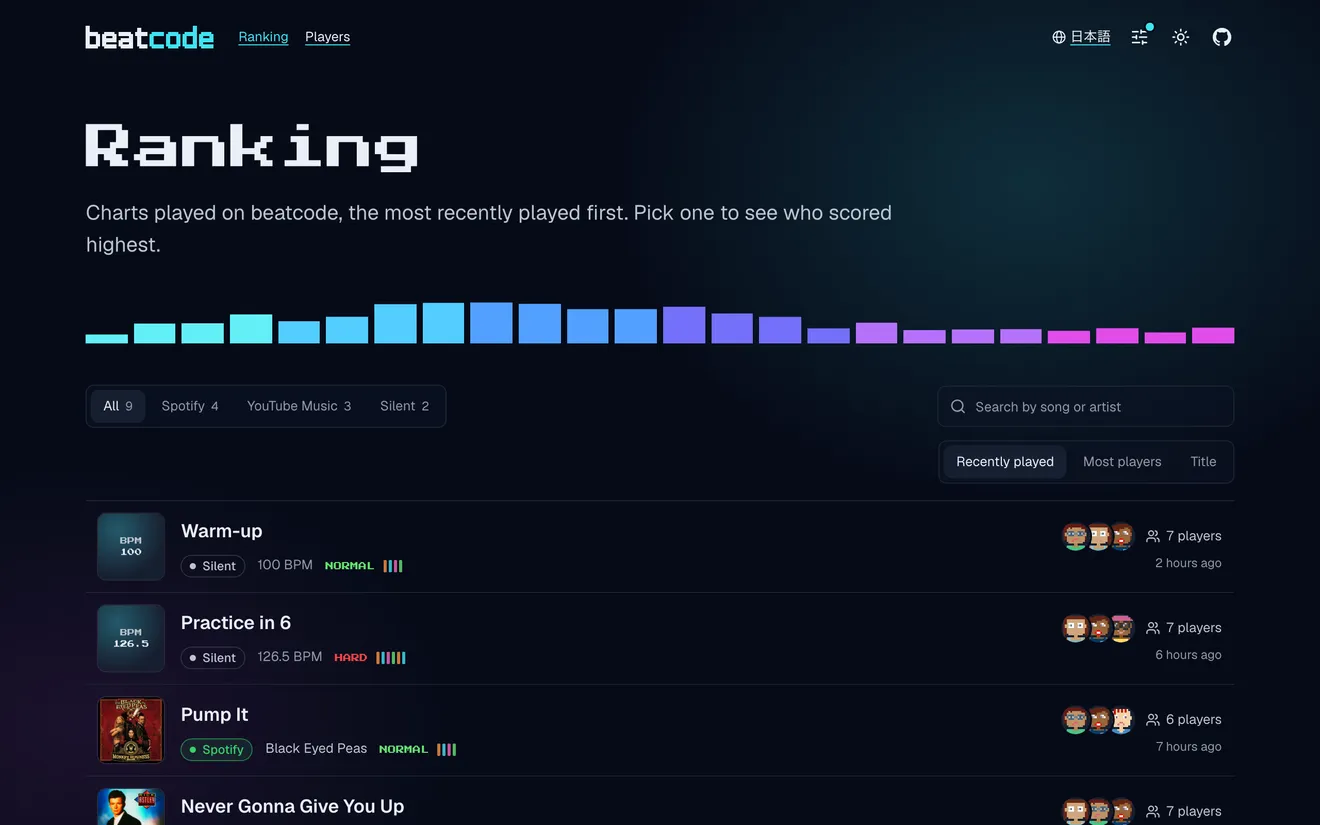
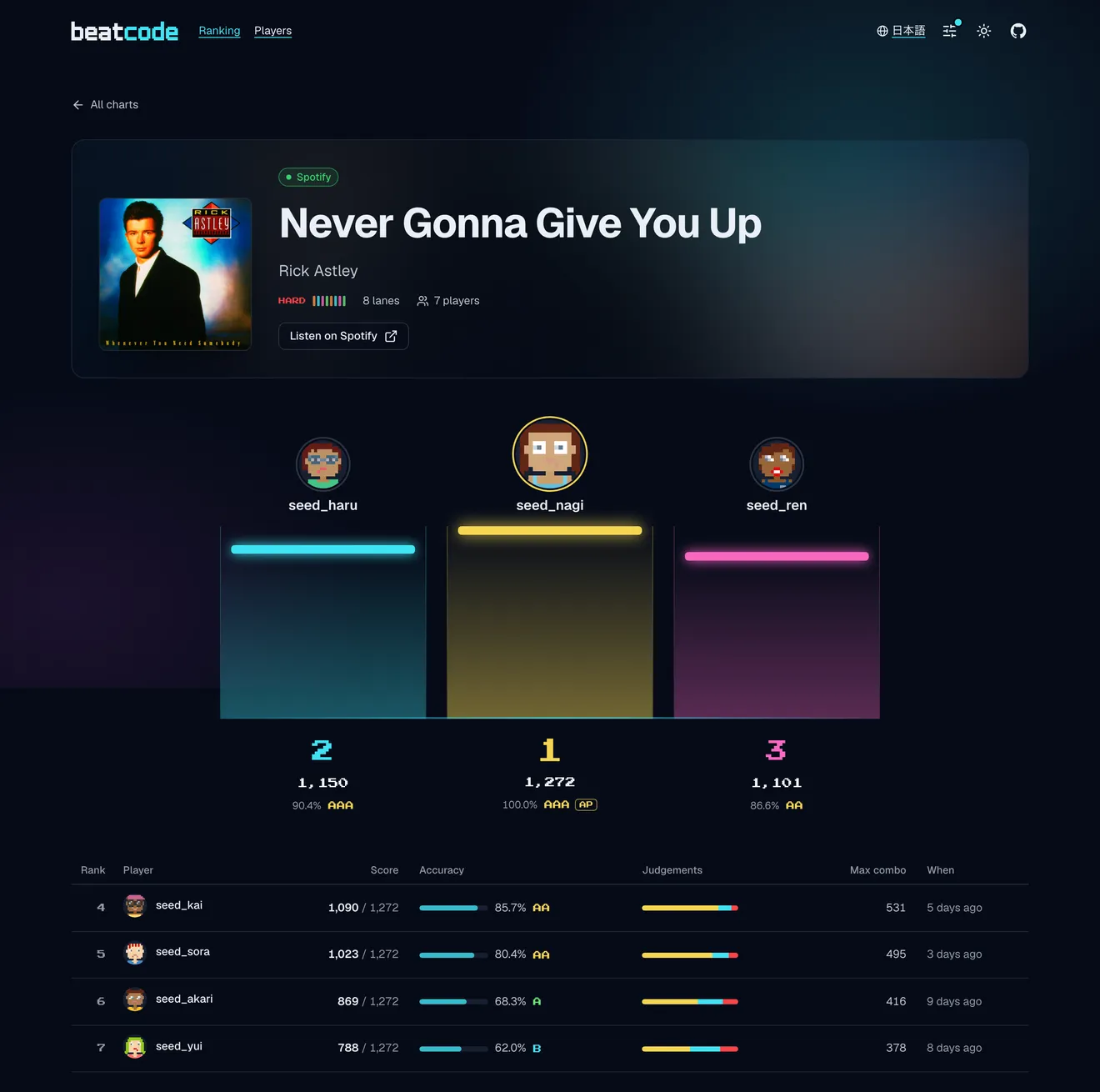
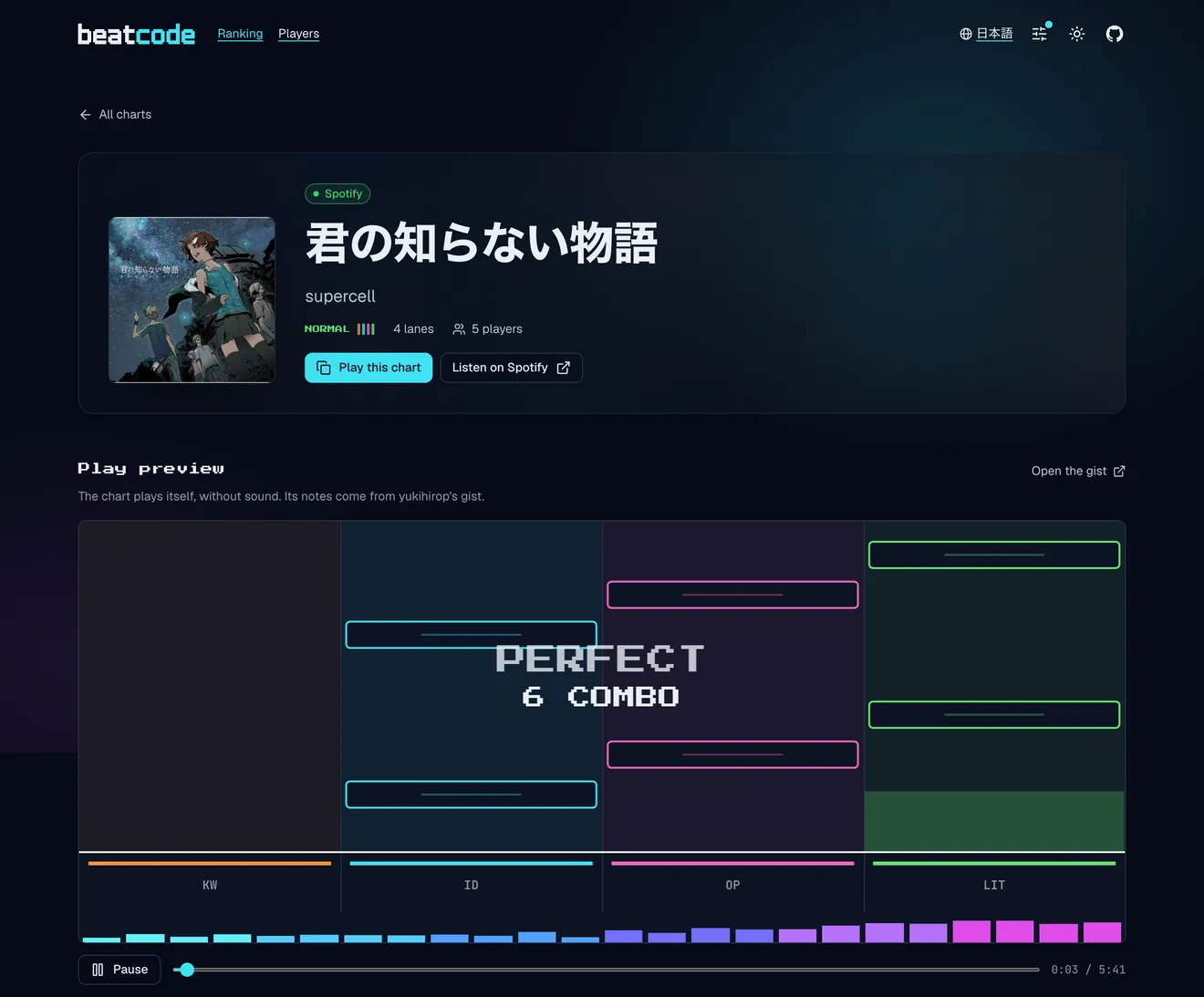
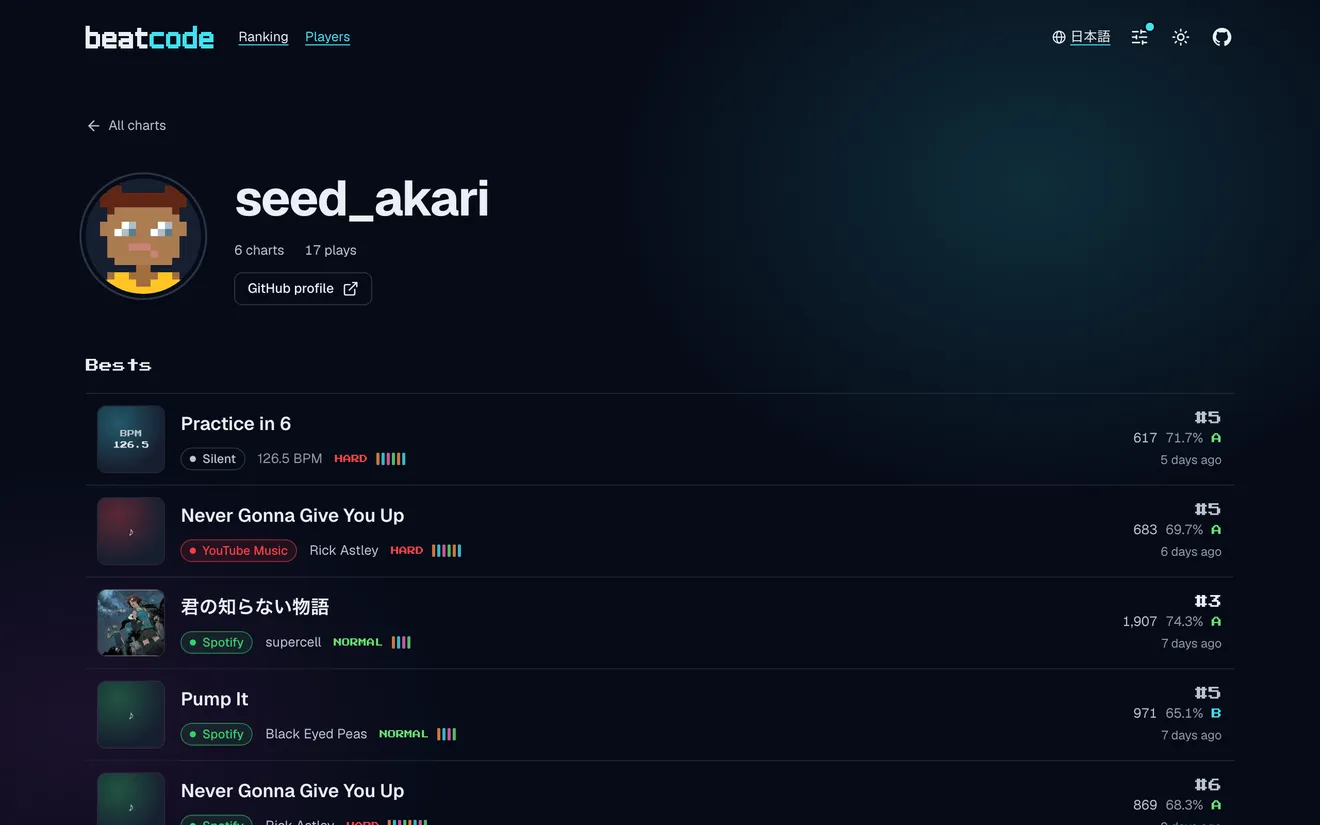
02Let a coding agent set it up
Copy this prompt into a coding agent (Claude Code, Codex and the like) on the machine that will run the server, or the one you reach it from. It reads this site, asks where to run it, writes the compose file and points your beatcode at it.
It asks before starting anything, and leaves the GitHub App’s secret, the sign-ins (gh, beatcode setup rank) and the Cloudflare tunnel token for you. Tokens are only checked for, never read.
Set up a ranking server for beatcode, a rhythm game that runs in the terminal, and point my beatcode at it. 1. Read https://beatcode.run/llms-full.txt first. It is the whole beatcode site; follow its Ranking server page.2. Ask me where to run it: on this machine with Docker, on a Raspberry Pi with Cloudflare Tunnel, or on a hosting service. Ask for the https address people will open (PUBLIC_URL) too, if there is one.3. Look without changing anything: whether docker and docker compose work, and my ~/.config/beatcode/config.toml.4. Tell me how to make the server's GitHub OAuth App as the page shows (Device Flow on, token expiration opted out), and let me make it myself. Write compose.yaml as the page shows, with /data on a volume (on a Raspberry Pi, on a USB SSD). Make .env readable only by me (chmod 600) and let me paste GITHUB_CLIENT_ID, GITHUB_CLIENT_SECRET and, for Cloudflare Tunnel, the tunnel token into it myself. Show me the file and ask before starting it, then check that /healthz answers {"ok":true}.5. Add ranking_server_url under [share] in my config.toml (read it first and add to [share] if it is there), then run beatcode --help to check it still loads.6. Give me beatcode setup rank to run myself. It signs in on github.com.7. Never read or print tokens or secrets: gh's, the GitHub App's, the tunnel's or beatcode's. Only check whether they exist.8. At the end, tell me the page's address, where ranking.db is and how to back it up, and anything left undone.03A GitHub App for the server
Each ranking server signs its players in with its own GitHub OAuth App, so a token a player sends to one server can’t be used on another. Make one at GitHub → Settings → Developer settings → OAuth Apps → New OAuth App (any homepage and callback URL, such as the page’s address).
On the App’s page, tick Enable Device Flow, opt out of token expiration (Activate optional features → Token expiration; beatcode doesn’t refresh tokens, so they would stop after 8 hours) and generate a client secret. Give the server GITHUB_CLIENT_ID and GITHUB_CLIENT_SECRET, and keep the secret out of any repository. Without them the page shows but plays are turned down.
04Run it
One container is the whole ranking. Open http://localhost:8080 for the page. The plays are kept in the volume at /data; without it, they go when the container does.
There is no database to run beside it: the server reads and writes /data/ranking.db, an SQLite file, itself.
docker run -d --name beatcode-ranking --restart unless-stopped -p 8080:8787 -v beatcode-ranking:/data -e GITHUB_CLIENT_ID=<client id> -e GITHUB_CLIENT_SECRET=<client secret> ghcr.io/yukihirop/beatcode-ranking:latest05With Docker Compose
The same in a compose.yaml, with PUBLIC_URL set. GITHUB_CLIENT_ID and GITHUB_CLIENT_SECRET come from a .env next to it, readable only by you. Start it with docker compose up -d.
services: ranking: image: ghcr.io/yukihirop/beatcode-ranking:latest restart: unless-stopped environment: PUBLIC_URL: https://ranking.example.com GITHUB_CLIENT_ID: ${GITHUB_CLIENT_ID} GITHUB_CLIENT_SECRET: ${GITHUB_CLIENT_SECRET} ports: - "8080:8787" volumes: - ranking-data:/data volumes: ranking-data:docker compose up -d06Settings
The server is plain HTTP. For HTTPS, put your own proxy (Caddy, nginx or a hosting service’s) in front of it and set PUBLIC_URL to the https address.
beatcode sends the player’s GitHub token (read:user only, from beatcode setup rank) with each play, so it sends only to https:// addresses, and to http:// only on your own machine (localhost, 127.0.0.1, [::1]).
Scores are self-reported, and the server limits how often one address or player can send. It logs sign-ins, turned-down plays and requests over the limits as JSON lines on its output (docker compose logs ranking).
| Variable | Default | Meaning |
|---|---|---|
| PUBLIC_URL | none | Where people open the page. The links in a board’s card (the picture X shows under a shared board) start with it. Left out, the address the request came to is used, which is http:// behind an HTTPS proxy |
| GITHUB_CLIENT_ID / GITHUB_CLIENT_SECRET | none | The server’s GitHub OAuth App (see above). Without them the server takes no plays |
| TRUST_PROXY | none | 1 only when a proxy in front sets X-Forwarded-For, -Proto and -Host itself. The limits then count each player’s address instead of the proxy’s |
| PORT | 8787 | The port the server listens on inside the container. Most hosting services set it |
| GITHUB_API_URL | https://api.github.com | Where the server asks whether a play’s token is its App’s, and reads gists |
| SHOW_SECRET_GISTS | none | 1 links a board to the beatmap gist its play preview comes from even when the gist is secret (beatcode makes a secret one when it sends a play). Anyone who opens the board can then open the gist, so set it only for a ranking only people you know open |
07Send plays to it
Put the page’s address in config.toml. Each time you finish a song, the results screen sends the play and says how it went; R there opens the board it went on.
Then sign in once with beatcode setup rank (a code to enter on github.com). beatcode signs in with that server’s GitHub App and keeps the token for that server only. It can only read your profile (read:user) and works only on that server, but still only put in a server you trust. The address has to be https:// (http:// only for localhost).
[share]ranking_server_url = "https://ranking.example.com"08On a hosting service
A host that runs a Docker image can run it as is: the image ghcr.io/yukihirop/beatcode-ranking, a volume (a persistent disk) at /data, PUBLIC_URL, and GITHUB_CLIENT_ID and GITHUB_CLIENT_SECRET (the secret in the host’s secret settings). Set TRUST_PROXY=1 if the host’s proxy sets X-Forwarded-For itself.
SQLite is one file on that one disk, so run one copy, not several.
09On a Raspberry Pi with Cloudflare Tunnel
A Raspberry Pi 4 or 5 with a 64-bit OS runs the image too: it is built for arm64. A Cloudflare Tunnel gives it an https address without opening a port on the Pi or your router, and keeps your home IP out of sight. It needs a domain on Cloudflare; a Quick Tunnel (trycloudflare.com) changes its address every time, so it doesn’t suit a ranking.
In Cloudflare’s dashboard, create a tunnel under Networking → Tunnels, pick Docker and keep only the token from the command it shows. Then add a route: Published application, your subdomain and domain, and the service URL http://ranking:8787 — the service name and port inside the compose file below.
The compose file has no ports at all: the tunnel is the only way in. Keep the tokens in .env next to it, readable only by you. All requests come through cloudflared, so to count each player for the limits add TRUST_PROXY: "1" to ranking’s environment (Cloudflare adds the player’s address to X-Forwarded-For; not tried yet). Put /data on a USB SSD rather than the SD card, which wears out under SQLite’s writes, and copy ranking.db somewhere else now and then (Update and back up, below). With restart: unless-stopped, both come back on their own after a power cut.
services: ranking: image: ghcr.io/yukihirop/beatcode-ranking:latest restart: unless-stopped environment: PUBLIC_URL: https://ranking.example.com GITHUB_CLIENT_ID: ${GITHUB_CLIENT_ID} GITHUB_CLIENT_SECRET: ${GITHUB_CLIENT_SECRET} volumes: - /mnt/ssd/beatcode-ranking:/data cloudflared: image: cloudflare/cloudflared:latest restart: unless-stopped command: tunnel --no-autoupdate run environment: TUNNEL_TOKEN: ${TUNNEL_TOKEN}curl -fsSL https://get.docker.com | shprintf 'TUNNEL_TOKEN=<the tunnel token>\nGITHUB_CLIENT_ID=<client id>\nGITHUB_CLIENT_SECRET=<client secret>\n' > .env && chmod 600 .envdocker compose up -dcurl https://ranking.example.com/healthz10Update and back up
The server makes its tables match the schema each time it starts, so pulling the new image and starting it again is the update. Versions are tagged (0.1.0); latest is the newest.
Every play is in /data/ranking.db. Copy it out while nothing is being sent. docker compose down -v removes the volume and every play with it.
docker compose pull && docker compose up -ddocker compose cp ranking:/data/ranking.db ./ranking.db